Linkdfolio Team
The best skills to put on a resume are the ones the job post asks for that you can back up with something on the page. For most people that means 10 to 20 hard skills, such as tools, languages, methods and certifications, grouped under two to four short labels. Show soft skills like communication and leadership in your bullets, where the reader can see them at work.
Most guides on this topic hand you a list of 100 or 200 skills. A long list doesn't tell you which ten to use. This guide gives you a way to choose: how to tell hard skills from soft skills, how to pull the right ones out of a job post, how to lay out the section, and a complete skills section for a new grad, before and after tailoring it to one job.
Hard skills vs soft skills
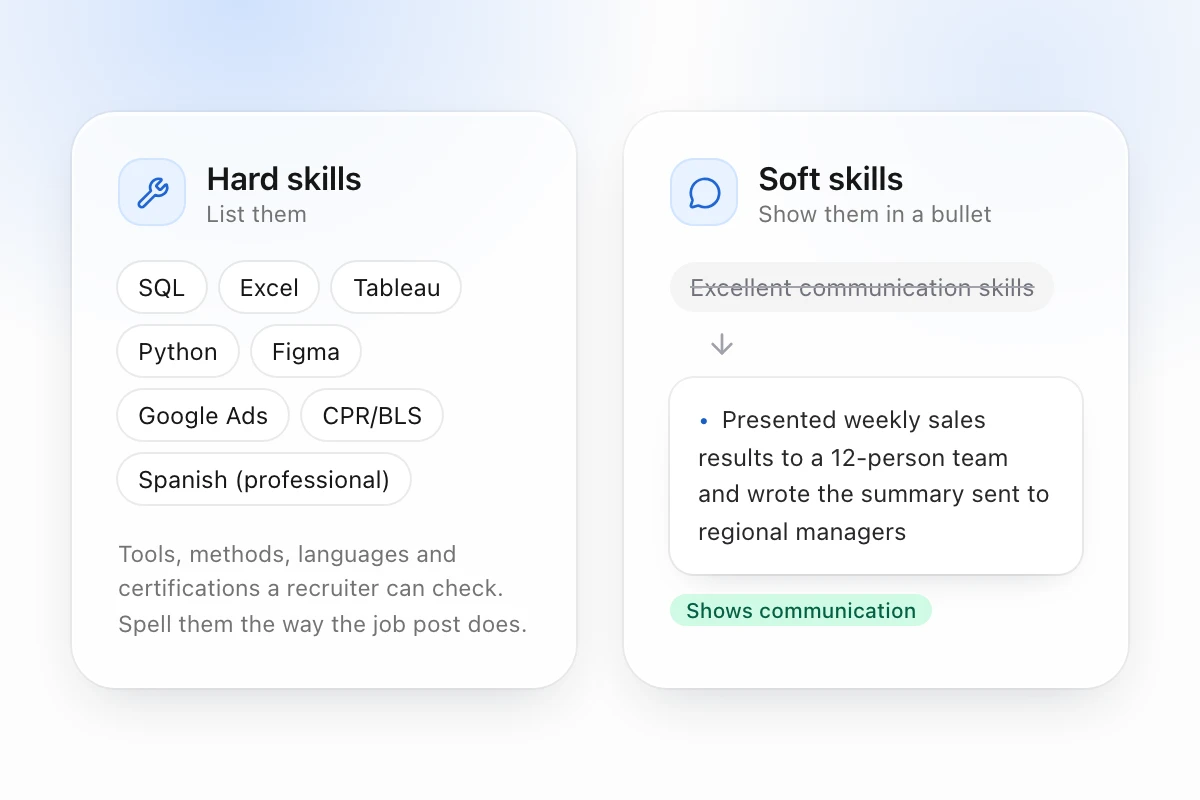
Hard skills are things you can be tested on: Python, Excel, SQL, Figma, phlebotomy, Spanish, a forklift license, GAAP accounting, Google Ads. A recruiter can check them, and the job post usually names them.
Soft skills describe how you work: communication, teamwork, problem solving, time management, adaptability. Every employer wants them, and anyone can type them, which is why a line that just says "Communication" carries little weight.
| Hard skills | Soft skills | |
|---|---|---|
| Examples | SQL, Tableau, AutoCAD, patient intake, copywriting | Communication, leadership, attention to detail |
| How you prove it | Name it in the skills section, then use it in a bullet | Show it in a bullet with a result |
| Where it goes | Skills section and bullets | Bullets and summary, sometimes one short skills line |
| Where the job post lists it | "Requirements" or "Qualifications" | "About you" or "Who you are" |
Use both. Put the hard skills in the list and show the soft skills in your bullets.
How to pick the skills to list on your resume
Start with the job post you're applying to. These four steps work for any posting.
- Mark every skill the job post names. Read the requirements and the duties, and mark each tool, method, language, certification and domain. "Experience with dashboards in Tableau or Power BI" gives you two skills and one kind of work.
- Keep only the ones you can back up. For each skill, find the line on your resume that shows you used it: a job, a project, a class or a certificate. If you can't point to one, leave the skill out. An interviewer will ask about anything on the page.
- Add your own skills that sit close to them. If the post asks for Tableau and you've built dashboards in Looker Studio, list it. A related tool tells the reader you'll learn theirs quickly.
- Spell them the way the post does. If the post says "PostgreSQL", write that, not "Postgres". If it says "Microsoft Excel", don't shorten it to "MS Office". Recruiters search their applicant tracking system using the post's own words.
Then order the list: the skills the post names first, the related ones after. If a skill does nothing for this job, cut it, even if you're proud of it.
Good skills for a resume, by field
These are the hard skills that come up again and again in job posts for each field. Use them to find skills you forgot you had, and add only the ones that match both you and the post.
| Field | Hard skills that often appear in job posts |
|---|---|
| Software | Python, Java, JavaScript, TypeScript, SQL, Git, REST APIs, AWS, Docker, testing |
| Data and analytics | SQL, Excel, Python, Tableau, Power BI, statistics, A/B testing, data cleaning |
| Marketing | SEO, Google Analytics, Google Ads, Meta Ads, email marketing, copywriting, HubSpot |
| Design | Figma, prototyping, user research, design systems, Adobe Illustrator, accessibility |
| Finance and accounting | Excel modeling, GAAP, reconciliation, QuickBooks, forecasting, variance analysis |
| Healthcare | Patient care, EHR systems such as Epic, vital signs, HIPAA, CPR/BLS certification |
| Sales and customer support | Salesforce, CRM management, prospecting, Zendesk, product demos |
| Operations and admin | Scheduling, inventory, Microsoft Office, Google Workspace, vendor management |
A few skills work in almost any field when the job calls for them: a second language (with your level, such as "Spanish (professional)"), Excel past the basics, and writing.
Soft skills for a resume: show them in a bullet
Anyone can write "excellent communication skills", so the line rarely persuades. The same skill reads as true when it's tied to something you did.
| Instead of listing | Write a bullet like |
|---|---|
| Communication | Presented weekly sales results to a 12-person team and wrote the summary sent to regional managers |
| Leadership | Led a 4-person class project to build a budgeting app, set the weekly plan and ran the demo |
| Problem solving | Found a duplicate-order bug in the checkout flow and cut refund requests by a third |
| Teamwork | Worked with design and support to rewrite the onboarding emails, which raised replies from new users |
| Time management | Worked 20 hours a week at the campus library while taking a full course load |
The numbers in your bullets should be your own. If you don't have a number, describe the scope: how many people, how often, for whom.
A short "Soft skills" line in the skills section is fine when the job post asks for those skills by name, for example "bilingual customer communication" for a support role. Keep it to two to four items, and make sure a bullet backs up each one.
How to format the skills section
- Group the skills under two to four short labels, such as Languages, Tools, Methods, Clinical or Marketing. One unlabeled line of 25 skills is hard to scan.
- Use 10 to 20 skills. Fewer looks thin for most roles. More starts to look like a keyword list.
- Put the section where it helps. A new grad or career changer can put it near the top, after education. Someone with several years of experience can put it after work history.
- Skip skill bars, stars and percentages. "Python 80%" tells the reader nothing they can check.
- Leave out the basics, such as email, the internet and typing, unless the job post asks for them.
- Keep it plain text. Separate skills with commas or vertical bars, and keep icons and tables out of the section.
Example: a new grad's skills section
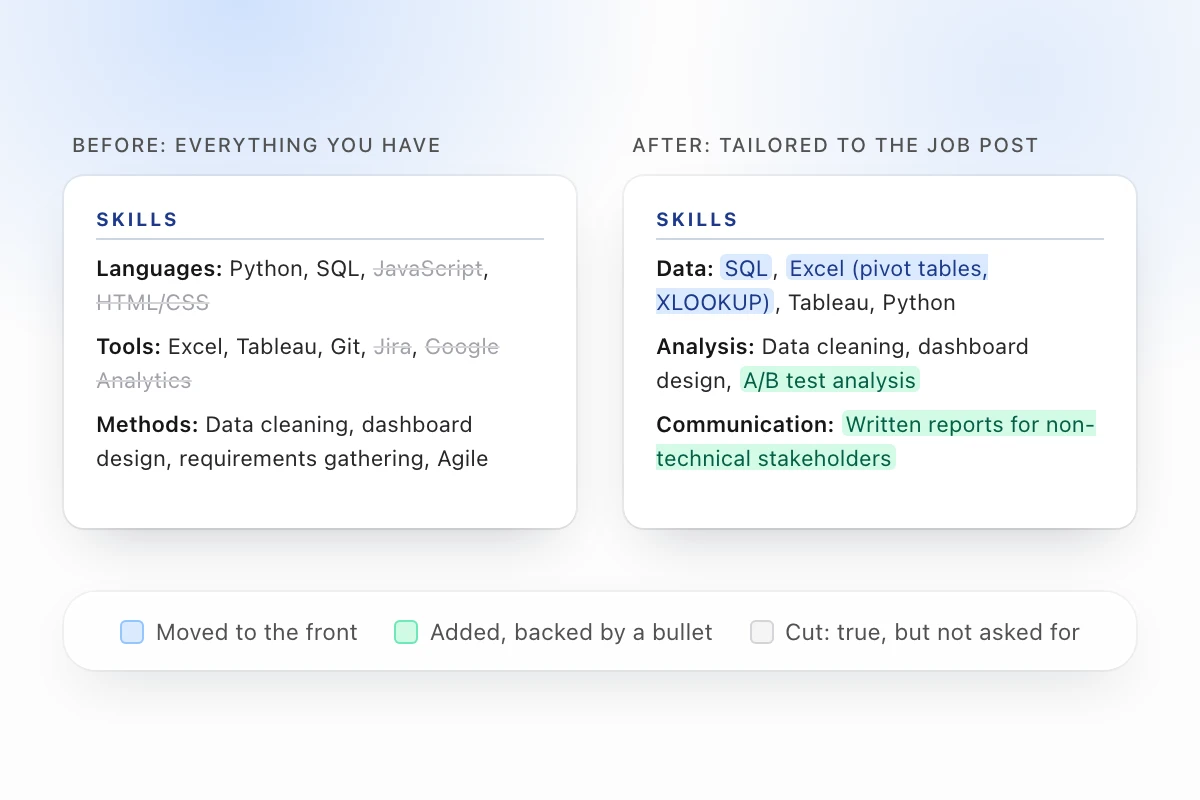
Here's a realistic skills section for a new grad with a degree in information systems, two internships and a few class projects. It's built from everything on their LinkedIn profile and old resume:
SKILLS
Languages: Python, SQL, JavaScript, HTML/CSS
Tools: Excel, Tableau, Git, Jira, Google Analytics
Methods: Data cleaning, dashboard design, requirements gathering, Agile
That's 13 skills in three groups, and each one shows up in a bullet below it. "Requirements gathering" is backed by an internship bullet about interviewing store managers, and "Tableau" by a capstone dashboard.
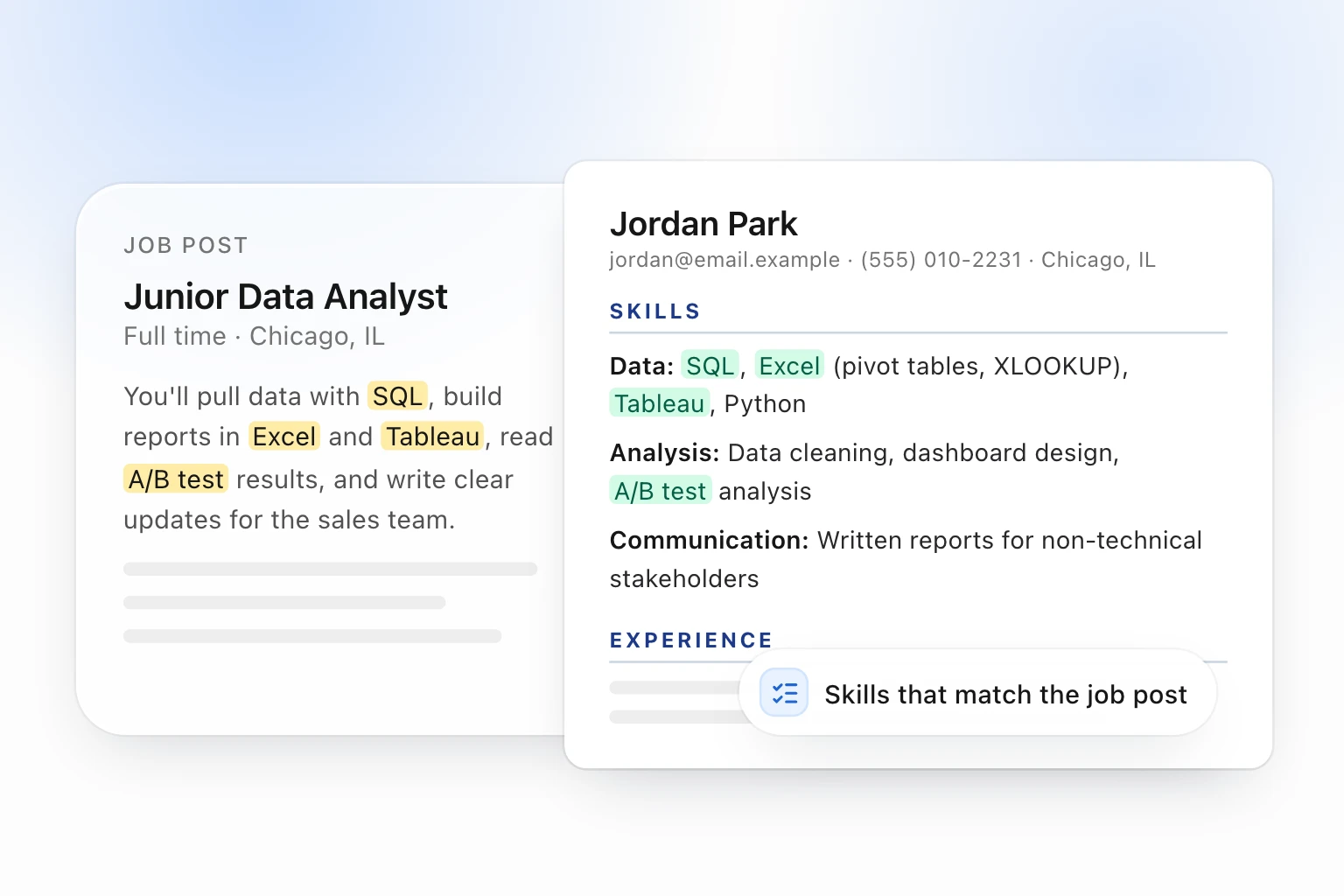
Now say they apply for a junior data analyst job whose post asks for "SQL and Excel (pivot tables, lookups)", "Power BI or Tableau", "experience with A/B test results" and "clear written communication". The same person, tailored to that job:
SKILLS
Data: SQL, Excel (pivot tables, XLOOKUP), Tableau, Python
Analysis: Data cleaning, dashboard design, A/B test analysis
Communication: Written reports for non-technical stakeholders
What changed:
- SQL and Excel moved to the front, because the post leads with them, and the Excel line now uses the post's own words.
- A/B test analysis was added because a class project already covered it. It was in the bullets but missing from the skills.
- JavaScript, HTML/CSS, Jira and Google Analytics came out. They're true, but this job doesn't ask for them.
- Power BI is not on the list, because this person has never used it. Tableau already covers the "or" in the post.
- Written communication got one line, because the post asks for it by name, and a bullet about weekly reports backs it up.
If you're a student, the student resume template is built for this layout: education and skills near the top, and room for projects.
Mistakes to skip
- Listing a skill you can't talk about. If a recruiter asks "tell me about a time you used Docker" and you can't answer, the line hurts you.
- Copying the whole job post into your skills. Use the post's words for skills you have. Pasting every requirement makes the resume read like a keyword list, and a recruiter will notice.
- Using one skills section for every job. Reorder and trim it for each application. It's the fastest part of the resume to tailor.
- Rating yourself. "Expert" and "5/5" invite a hard question. Let the bullets show your level.
- Listing old tools. Drop software the field no longer uses, unless the post names it.
How Linkdfolio builds and tailors your skills section
If you'd rather not do the sorting by hand, the Linkdfolio resume builder does the steps above from what you already have:
- It starts from your skills. Paste your LinkedIn URL or upload an old resume. Linkdfolio imports the skills from both and removes duplicates. You can also turn a LinkedIn profile into a resume directly.
- It picks and groups them. When it writes your resume, it chooses the skills that fit your field or the roles you're aiming for, usually 10 to 20, with the best fits first. It groups them under at most four short labels and keeps each skill spelled as you wrote it.
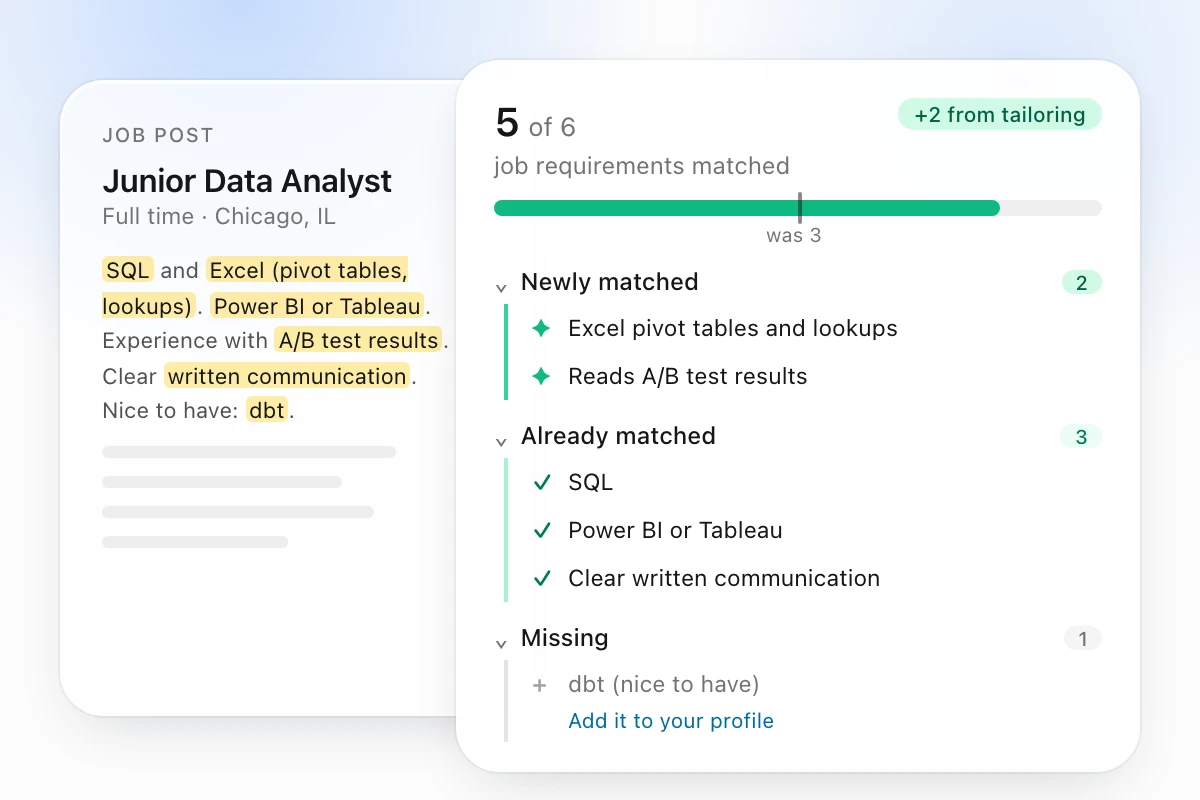
- It tailors them to a job post. Paste the job post, and it breaks the post into the requirements it asks for. It puts the skills the job names first, leaves out the ones that don't help, and shows which requirements your resume matches and which are missing. See how tailoring a resume to a job description works.
- It never adds a skill you don't have. The tailored list only uses skills already on your resume or profile. When the job asks for something you don't have, Linkdfolio shows it to you, and you decide whether to add it.
Every template downloads as a clean, ATS-friendly PDF that applicant tracking systems can read. The free plan lets you keep 2 resumes and gives you 2 AI-written or tailored resumes a month. No credit card needed.
Next steps
- Open the job post you care about most and mark every skill it names.
- Cut your list down to the 10 to 20 skills you can back up, ordered the way the post orders them.
- Build the resume in Linkdfolio → from your LinkedIn profile or old resume, then tailor it to that post.
For a website link to go with your resume, see where to put a website on your resume. More guides are on the Linkdfolio blog.